Wireless connectivity has become an essential part of daily business operations. Retail stores, grocery locations, restaurants, warehouses, offices, and other commercial facilities depend on Wi-Fi to support employees, customers, connected devices, and business applications.
However, providing reliable wireless connectivity becomes more challenging when many devices use the network in the same area.
A wireless network that performs well in a lightly occupied office may struggle in a busy retail store, conference space, or large commercial facility where hundreds of devices compete for available wireless capacity. Users may experience slow connections, inconsistent performance, dropped sessions, and difficulty accessing business applications.
These problems are not always caused by insufficient signal strength. In high-density environments, the number of connected devices, available wireless airtime, channel utilization, interference, and access point configuration can have a greater impact on performance than coverage alone.
Designing a wireless network for these conditions requires a different approach. Instead of simply installing more access points to increase coverage, network planners must consider how wireless capacity will be distributed and shared throughout the facility.
This article explains the key considerations involved in designing a wireless network for high-density environments and how proper planning, installation, and testing can support more reliable commercial connectivity.
What Is a High-Density Wireless Environment?
A high-density wireless environment is an area where a large number of wireless devices operate within a relatively limited physical space.
These devices share available radio frequency resources to communicate with wireless access points. As the number of active devices increases, the network must manage more connections and compete for limited wireless airtime.
High-density environments may include:
- Retail stores during peak shopping hours
- Grocery stores with numerous connected checkout and handheld devices
- Restaurants with employee and customer Wi-Fi usage
- Conference rooms and meeting facilities
- Warehouses with wireless inventory systems
- Offices with high employee device density
- Training facilities and educational spaces
- Large commercial venues with concentrated user activity
The number of connected devices is only one part of the equation. Their activity patterns also matter.
For example, a retail store may have employees using wireless handheld devices, customers connecting smartphones, POS systems communicating with business applications, and wireless equipment operating throughout the facility.
A conference room may have fewer physical devices than a large retail store, but those devices could all be active simultaneously during a video conference or presentation.
A successful wireless design must account for both the number of devices and how they use the network.
Why High-Density Wi-Fi Networks Are More Difficult to Design
Traditional wireless planning often begins with coverage: determining whether a signal can reach the areas where users need connectivity.
In high-density environments, coverage is only one requirement.
A network may provide strong signal strength throughout a facility and still perform poorly because too many devices are competing for available airtime.
Several factors make high-density wireless environments more challenging.
Limited Wireless Airtime
Wi-Fi is a shared communication medium. Devices operating on the same channel must coordinate their transmissions rather than communicate simultaneously without restriction.
As more devices use the same wireless resources, competition for airtime can increase.
This can result in:
- Higher network latency
- Reduced throughput per device
- Longer transmission delays
- Inconsistent application performance
- Slower response times during peak usage
Adding access points does not automatically solve this problem. If access points use overlapping channels or are positioned too closely without proper channel planning, they may contribute to additional contention.
Radio Frequency Interference
Wireless networks operate in shared frequency bands. Nearby access points, neighboring businesses, and other electronic devices may affect wireless performance.
In a commercial building, multiple networks may operate within close proximity.
Without proper assessment and channel planning, access points may compete for the same frequencies or experience interference from nearby systems.
High Device Concentration
Devices may be distributed unevenly throughout a facility.
For example, a retail store may have relatively few connected devices in its stockroom but a much higher concentration near checkout counters and customer service areas.
A design based only on total building square footage may overlook these differences.
Different Device Capabilities
Not every wireless device supports the same Wi-Fi standards, frequency bands, channel widths, or advanced features.
Older devices may have fewer capabilities than newer equipment.
A network must account for the client devices it is expected to support rather than assuming that every connected device can take advantage of the latest wireless technology.
8 Key Considerations When Designing a Wireless Network for High-Density Environments
A high-density wireless deployment should be designed around actual usage requirements, physical conditions, and network capacity.
The following considerations help create a more effective wireless design.
1. Assess Device Density and Usage Requirements
The first step is understanding how the wireless network will be used.
Simply counting the number of devices in a facility is not enough. Network planners should also determine which devices will be active simultaneously and what applications they will use.
Consider the following examples:
| Environment | Typical Wireless Devices and Activities |
| Retail store | Employee handhelds, customer smartphones, tablets, inventory devices |
| Grocery store | Mobile inventory equipment, employee devices, wireless access points, connected business systems |
| Restaurant | Employee tablets, handheld ordering devices, customer smartphones |
| Warehouse | Barcode scanners, inventory terminals, mobile workstations |
| Office | Laptops, smartphones, video conferencing equipment, wireless peripherals |
| Conference facility | Laptops, smartphones, tablets, presentation systems |
The network design should consider:
- Estimated number of connected devices
- Expected simultaneous usage
- Application bandwidth requirements
- Real-time communication requirements
- Device mobility throughout the facility
- Areas with concentrated wireless activity
- Expected future growth
For example, a facility may have 300 wireless devices registered on its network, but only a portion may be actively transmitting at a given time.
The design should account for realistic usage patterns rather than treating every connected device as equally active.
Why it matters: Understanding device density and application requirements helps determine how wireless capacity should be distributed across the facility.
2. Conduct a Wireless Site Survey
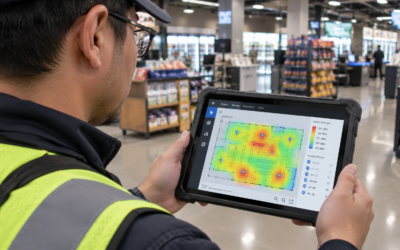
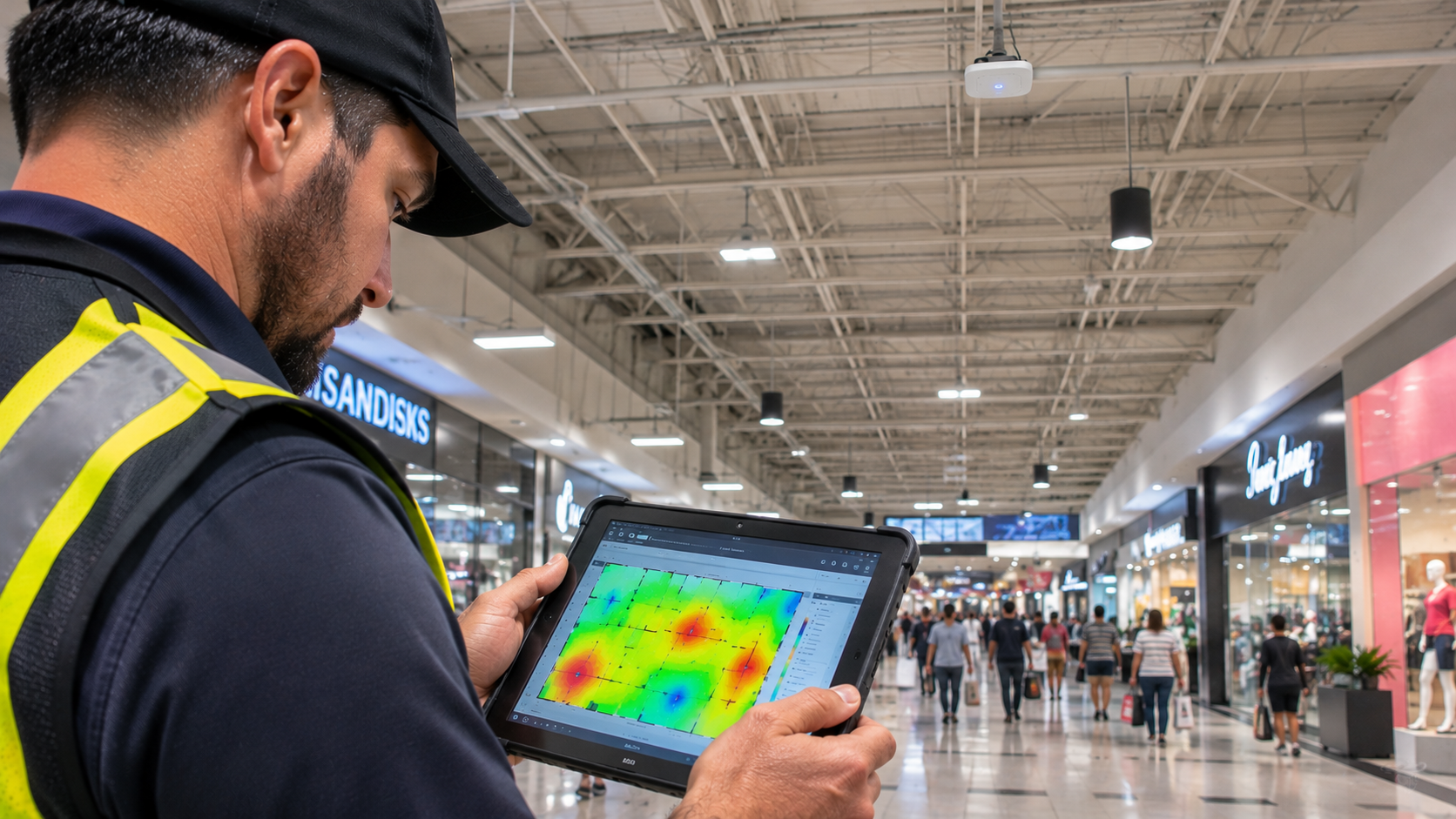
A wireless site survey provides information about the physical environment and existing radio frequency conditions before installation.
This is especially important in high-density environments, where access point placement and channel planning can significantly influence network performance.
A site survey may evaluate:
- Building dimensions and floor plan
- Wall and ceiling construction
- Existing wireless networks
- Signal strength and coverage
- Channel utilization
- Potential interference sources
- Areas with high device concentration
- Access point mounting locations
A predictive survey can help establish an initial wireless design using building plans and equipment specifications. An on-site assessment can provide additional information about actual environmental conditions.
After installation, validation testing helps determine whether the deployed network performs as intended.
Skipping this planning stage can result in poor access point placement, unnecessary overlap, and coverage or capacity problems.
Learn more about the importance of Wi-Fi site surveys and when to conduct a Wi-Fi site survey.
Why it matters: A site survey provides a more reliable foundation for wireless design decisions and helps identify potential problems before they become expensive installation corrections.
3. Plan Access Point Placement Around Capacity, Not Just Coverage
Access point placement is one of the most important parts of high-density wireless design.
A common mistake is installing access points based primarily on signal coverage. While coverage is necessary, high-density environments also require careful consideration of how many devices each access point is expected to support.
A design should identify areas where wireless demand is concentrated and distribute access point capacity accordingly.
For example:
- Checkout areas may require additional wireless capacity because of employee devices and connected business systems.
- Conference rooms may experience simultaneous activity from many laptops and smartphones.
- Warehouse areas may require reliable coverage across long aisles and changing inventory layouts.
- Customer-facing areas may experience fluctuating device density throughout the day.
Access points should be positioned to support these usage patterns while accounting for physical obstacles and radio frequency conditions.
Installing too many access points in a small area can create additional channel contention and interference if the design does not account for channel reuse and transmit power.
Likewise, placing access points too far apart may create coverage gaps or force devices to connect to distant access points.
Why it matters: Effective placement balances coverage and capacity rather than treating the number of access points as the primary measure of network performance.
4. Develop an Appropriate Channel Allocation Strategy
Wireless access points use radio frequency channels to communicate with connected devices.
When several nearby access points use the same or overlapping channels, they may compete for wireless airtime.
Channel planning helps distribute wireless activity more efficiently.
Important considerations include:
- Available channels in each frequency band
- Channel width
- Nearby wireless networks
- Channel utilization
- Interference conditions
- Access point proximity
- Client device compatibility
In high-density environments, narrower channel widths can often provide more opportunities for channel reuse.
For example, 20 MHz channels are commonly considered in dense 5 GHz deployments because they allow more non-overlapping channel assignments than wider channels.
Wider channels can provide higher peak data rates under suitable conditions, but they also consume more spectrum and may reduce the number of available channel assignments within a given frequency band.
The appropriate channel width depends on the wireless environment, regulatory requirements, equipment capabilities, and performance objectives.
Channel selection should also account for neighboring networks and changing radio frequency conditions.
Why it matters: A well-planned channel strategy helps reduce unnecessary competition between nearby access points and supports more efficient use of available wireless spectrum.
5. Use Frequency Bands Strategically
Modern commercial wireless networks may operate across the 2.4 GHz, 5 GHz, and 6 GHz frequency bands, depending on the access points, client devices, and regulatory availability.
Each band has different characteristics.
| Frequency Band | General Characteristics | High-Density Considerations |
| 2.4 GHz | Longer propagation range but limited channel availability and greater congestion in many environments | Useful for compatible devices that require it, but often less suitable for concentrating high-capacity traffic |
| 5 GHz | More channel options and generally greater capacity than 2.4 GHz | Commonly used for commercial Wi-Fi deployments, with careful channel planning |
| 6 GHz | Additional spectrum available to compatible Wi-Fi 6E and Wi-Fi 7 devices where permitted | Can provide more channel options, but requires compatible client devices and consideration of propagation characteristics |
The 6 GHz band is not automatically available for every deployment. Regulatory rules vary by country, and supported devices and access points must be compatible.
A high-density network should use available frequency bands strategically rather than relying on one band for every device.
Where supported, steering compatible devices toward less congested bands can help distribute wireless demand.
However, band steering should not be treated as a replacement for proper channel planning, access point placement, or capacity design.
Why it matters: Using available frequency bands appropriately helps distribute wireless traffic and makes better use of the spectrum supported by the facility’s devices and equipment.
6. Configure Transmit Power and Coverage Overlap Carefully
Access point transmit power influences how far a wireless signal travels and how devices interact with nearby access points.
Increasing transmit power may appear to be an easy way to improve coverage, but higher power is not always better.
If access points transmit too strongly, devices may remain connected to distant access points instead of transitioning to closer ones.
Excessive signal overlap can also contribute to unnecessary interference and channel contention.
On the other hand, transmit power that is too low may create coverage gaps and weak connections.
Wireless design should consider:
- Access point spacing
- Building materials
- Client device transmit capabilities
- Signal strength requirements
- Coverage overlap
- Roaming behavior
- Channel assignments
The objective is to create a balanced wireless environment where devices can maintain appropriate connections as users move throughout the facility.
Why it matters: Proper transmit power and coverage planning help balance wireless coverage, roaming, and interference.
7. Account for Roaming and Device Mobility
In commercial facilities, employees and connected devices may move between different areas while maintaining active network sessions.
Examples include:
- Retail employees moving between checkout counters and stockrooms
- Warehouse workers using handheld inventory scanners
- Restaurant employees carrying mobile ordering devices
- Office employees moving between meeting rooms
- Facility staff using tablets throughout a building
When devices move between access point coverage areas, they may need to transition to another access point.
Poor roaming conditions can result in delayed connections, dropped sessions, or inconsistent application performance.
A high-density wireless design should evaluate how users and devices move through the facility.
This includes considering coverage overlap, signal conditions, client capabilities, access point configuration, and roaming-related features supported by the equipment.
Testing should include movement through important operational areas rather than evaluating wireless performance only from stationary locations.
Why it matters: Good roaming design helps mobile devices maintain connectivity as employees move through the facility.
8. Build a Reliable Wired Infrastructure to Support Wireless Capacity
Wireless access points depend on the wired network infrastructure connecting them to switches and other network equipment.
Even when wireless coverage is excellent, inadequate wired infrastructure can become a bottleneck.
Important considerations include:
- Ethernet cabling capacity
- Switch port availability
- Uplink bandwidth
- Power over Ethernet (PoE) requirements
- Network segmentation
- Equipment placement
- Cable pathway availability
For example, an access point may support high wireless data rates, but its actual performance can be limited by the Ethernet connection or switch uplink supporting it.
PoE capacity is also important. Network switches must provide sufficient power for the access points and other connected devices.
For more information, explore our articles on the core components of a reliable network infrastructure and how electrical infrastructure affects network performance.
Why it matters: A high-capacity wireless network requires a supporting wired infrastructure capable of handling the traffic and power requirements of its access points.
Choosing the Right Wireless Equipment for High-Density Deployments
Selecting wireless equipment requires more than comparing advertised maximum speeds.
Access points should be evaluated based on the expected deployment environment, supported client devices, network requirements, and management capabilities.
Important specifications and features may include:
| Equipment Consideration | Why It Matters |
| Supported Wi-Fi generation | Determines available wireless capabilities and client compatibility |
| Frequency band support | Influences available spectrum and channel planning |
| Spatial streams | Affects potential data capacity under suitable conditions |
| Multi-user capabilities | Helps manage communication with multiple compatible devices |
| Ethernet uplink | Determines how the access point connects to the wired network |
| PoE requirements | Ensures compatible power delivery from network switches |
| Centralized management | Supports configuration and monitoring across multiple access points |
| Security capabilities | Helps protect wireless access and business network resources |
Features such as Multi-User Multiple Input Multiple Output (MU-MIMO) and Orthogonal Frequency Division Multiple Access (OFDMA) can improve wireless resource management when supported by compatible access points and client devices.
However, these technologies do not eliminate the need for good RF design.
The performance of a high-density wireless network still depends on access point placement, channel allocation, client behavior, available airtime, wired infrastructure, and the actual application workload.
Testing and Validating a High-Density Wireless Network
A wireless design should be validated after installation.
A network that appears correct on a floor plan may perform differently once access points are installed and real devices begin using the system.
Post-installation testing should evaluate whether the network meets the intended coverage and performance requirements.
Coverage Testing
Check signal availability throughout the facility, especially in areas where employees and business applications depend on wireless connectivity.
Capacity and Performance Testing
Evaluate network performance in areas with concentrated device activity.
Where possible, testing should reflect realistic usage conditions rather than relying exclusively on isolated speed tests.
Interference and Channel Utilization
Review channel conditions and identify areas where nearby wireless networks or other sources of interference may affect performance.
Roaming Testing
Test devices while moving through the facility to identify connection interruptions or unexpected transitions between access points.
Application Testing
Evaluate the applications that depend on wireless connectivity, such as inventory systems, employee tablets, and other business-critical tools.
Documentation
Record access point locations, equipment information, channel assignments, configuration details, testing results, and relevant installation notes.
A documented deployment makes it easier to troubleshoot problems and plan future changes.
Common Mistakes to Avoid in High-Density Wi-Fi Design
Even a well-equipped wireless network can experience performance problems when the design does not reflect actual operating conditions.
| Common Mistake | Potential Consequence | Better Approach |
| Designing only for coverage | Strong signal but insufficient capacity | Plan for both coverage and expected device activity |
| Installing too many access points | Increased channel contention and interference | Use survey findings to guide placement and channel reuse |
| Using wide channels everywhere | Fewer available channel assignments | Evaluate narrower channels in dense environments |
| Ignoring client capabilities | Inconsistent performance across devices | Account for the actual devices connecting to the network |
| Increasing transmit power excessively | Poor roaming and unnecessary overlap | Balance transmit power with coverage and channel planning |
| Overlooking wired infrastructure | Bottlenecks between access points and the network | Verify cabling, switch capacity, uplinks, and PoE |
| Skipping post-installation testing | Problems remain undiscovered | Validate coverage, capacity, roaming, and application performance |
| Reusing the same design at every location | Inconsistent results across facilities | Standardize processes while accounting for site-specific conditions |
Designing High-Density Wireless Networks for Multi-Site Businesses
For businesses operating across multiple locations, wireless network design involves additional coordination.
A retailer may have dozens or hundreds of facilities, each with different layouts, construction materials, equipment requirements, and wireless usage patterns.
A standardized approach helps maintain consistency, but the physical design should still reflect individual site conditions.
A practical multi-site wireless deployment process includes:
1. Site assessment: Review each facility’s floor plan, wireless requirements, existing infrastructure, and potential installation obstacles.
2. Wireless planning: Determine expected device density, access point requirements, channel strategy, and coverage objectives.
3. Equipment staging: Prepare access points, network switches, cabling, and other materials before field installation.
4. Installation: Deploy wireless equipment and supporting infrastructure according to approved project requirements.
5. Quality assurance: Validate equipment installation, connectivity, configuration, and required performance criteria.
6. Turnover: Provide installation documentation, equipment records, and closeout information.
Centralized project management and standardized execution procedures help coordinate work across geographically distributed facilities.
However, the deployment plan should allow for adjustments when a particular location has different building conditions or wireless requirements.
For additional guidance, read our article on managing multi-site network installations.
How Prime-Net Supports Commercial Wireless Network Deployments
Prime-Net, the technology deployment division of Prime Retail Services, Inc., supports nationwide technology installation projects for multi-site retail and commercial environments.
Its capabilities include Wireless Networks, Network Infrastructure, Point-of-Sale Installation, CCTV Installation, Project Staffing, and Digital Menu Boards.
For businesses planning wireless deployments, the supporting infrastructure and field execution are important parts of the overall project.
Prime-Net’s Wireless Networks services support commercial wireless deployment requirements, while its Network Infrastructure services address the physical connectivity and supporting network components.
Prime-Net follows a structured deployment workflow:
1. Survey: Evaluate site conditions, installation requirements, and project readiness.
2. Staging: Prepare equipment and coordinate materials before field deployment.
3. Installation: Deploy wireless equipment and supporting network infrastructure.
4. Quality Assurance: Review completed work and verify installation requirements.
5. Turnover: Provide project documentation and closeout information.
Through centralized project management, trained field resources, and standardized execution procedures, Prime-Net helps businesses coordinate technology deployments across individual facilities and larger multi-site programs.
The objective is to support consistent installation execution while accounting for the requirements of each location.
Frequently Asked Questions
What makes a wireless network high-density?
A high-density wireless environment contains many devices operating within a relatively small area. These devices compete for available wireless airtime, which can affect throughput, latency, and overall network performance.
How many access points are needed for a high-density environment?
There is no universal number of access points for every high-density deployment. The requirement depends on facility layout, building materials, device density, application demands, available spectrum, and access point capabilities. A wireless site survey and capacity assessment help determine an appropriate design.
Is adding more access points the best way to improve high-density Wi-Fi?
Not necessarily. Adding access points without proper channel planning and power configuration can increase interference and wireless contention. The network should be evaluated to determine whether the actual problem involves coverage, capacity, interference, or another factor.
Which Wi-Fi frequency band is best for high-density environments?
The appropriate band depends on the equipment, client device capabilities, regulatory availability, and wireless environment. The 5 GHz band is commonly used in commercial deployments, while compatible 6 GHz equipment can provide additional spectrum where permitted. The 2.4 GHz band may still be necessary for certain devices.
Are wider Wi-Fi channels better for high-density networks?
Not always. Wider channels can provide higher peak data rates under suitable conditions, but they use more spectrum and reduce the number of available channel assignments. Narrower channels, such as 20 MHz, are often considered in dense 5 GHz deployments to improve channel reuse.
What is the difference between Wi-Fi coverage and capacity?
Coverage refers to where a wireless signal is available and usable. Capacity refers to how much wireless traffic the network can support under expected operating conditions. A facility can have strong coverage but insufficient capacity when too many devices compete for available airtime.
Why is a wireless site survey important for high-density deployments?
A site survey helps identify physical obstacles, existing wireless networks, signal conditions, and potential interference. It provides information that supports access point placement, channel planning, and capacity design.
Final Thoughts
Designing a wireless network for high-density environments requires more than providing a strong signal throughout a facility.
Businesses must account for device density, wireless airtime, interference, access point placement, channel allocation, roaming, and the capacity of the supporting wired infrastructure.
A network designed only for coverage may struggle when many devices begin using it simultaneously. Effective planning considers how wireless resources will be shared and how the network will perform during actual business operations.
For multi-location businesses, standardized deployment processes combined with site-specific wireless planning help support more consistent results across facilities.
Planning a commercial wireless network deployment?
Contact Prime-Net at info@prime-net.net to discuss your wireless network installation, infrastructure, and multi-site deployment requirements.